5 min read
 Adithyan Rs
Introduction
This blog explores the changes to the Communication System in SAP Sales/Service Cloud Version 2 (SSCV2) that lay the foundation for integrating with external systems, whether through direct API connectivity, middleware-mediated scenarios via SAP Integration Suite, or side-by-side extensibility on SAP Business Technology Platform (BTP). It also covers the authentication mechanisms available in SCV2 and how they compare and, in many ways, contrast with what SAP Cloud for Customer (C4C) offered.
Having worked in the SAP CX space for over 12 years across SAP C4C, SAP Field Service Management (FSM), SAP Customer Data Cloud (Gigya) and SAP Marketing Cloud, our recent implementation on SAP Sales/Service Cloud V2 gained some significant learnings, particularly around how the integration and extensibility model has fundamentally evolved from the C4C era.
The following abbreviations are used throughout this blog:
SAP C4C - SAP Cloud for Customer
SAP SSCV2 - SAP Sales/Service Cloud V2 (latest version of the product)
What is a Communication System?
In both SAP C4C and Sales/Service Cloud V2, a communication system represents an external logical system instance, such as a SAP BTP subaccount, an ERP back-end, or a middleware platform that exchanges data with Sales Cloud. Think of it as the identity card you issue to a partner system before it can walk in the door.
SAP C4C Baseline — What We're Moving Away From
SAP Cloud for Customer's integration model has the authentication methods that support the administrators to have two choices:
- Basic Authentication
- SSL / X.509 Certificates
Why this matters now: Basic authentication is being phased out across SAP's landscape. SAP SuccessFactors and SAP BTP have already announced sunset timelines for Basic Auth on their APIs. Organisations must migrate their integrations to OAuth 2.0 before this deadline to prevent disruptions.
SAP Sales/Service Cloud V2 Communication System — A Richer Model
SAP Sales/Service Cloud V2 provides a future-proof solution with multiple options to the SAP partners/customers.
When you create a communication system in Sales Cloud V2 (via Settings → Integration → Communication Systems), you'll immediately notice it's structured around two distinct directions, each with its own authentication model.
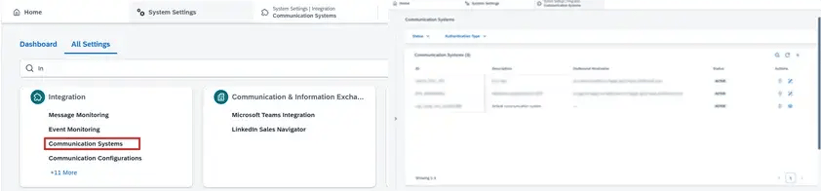
SAP Sales/Service Cloud V2 communication system and authentication model.
Deleted Communication Systems
A key improvement in SAP SSCV2 is the ability to restore the communication system after it is deleted.
An administrator can delete a communication system and it is moved to the deleted communication systems rather than being removed from the system entirely, unlike in SAP C4C.
Steps to Delete a Communication System
1a. Change the Status of the Communication System from Active to Inactive
1b. Click the Delete button
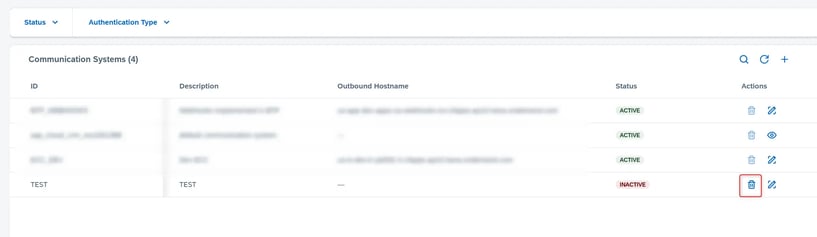
1c. Deleted communication system visible in the section below:

2. Remaining Days shows the number of days until the system removes it from the deletion table in SAP SSCV2. Clicking the Undo button will deactivate the communication system.
3. Clicking the Delete button will permanently delete it from SAP SSCV2.
The retention time for the deleted communication system is 60 days. After 60 days, it is permanently deleted and cannot be recovered.
Authentication Methods: Comparison between SAP C4C and SAP SSCV2
The table below lists the authentication methods available for Inbound and Outbound connectivity with SAP SSCV2.
The ideal scenario would be to integrate SAP SSCV2 with SAP Integration Suite and use SAP BTP (Kyma or Cloud Foundry) for extensibility.
| Direction | Type | SAP C4C | SAP SSCV2 | Notable Changes |
|
Inbound |
Basic Authentication (Username / Password) |
Business user controlled by Business Roles assigned & Technical User authentication. |
Technical User authentication is controlled by the Technical Roles assigned. Clear separation between a Technical User and a business user |
Improved access control on Technical User and Technical Roles in SAP SSCV2 |
|
Inbound |
SSL Client Certificates |
Key pair certificate created in C4C, middleware, or an external system. |
Key pair certificate created in a middleware or an external system. |
Remains the same with a different user experience in SAP SSCV2 |
|
Outbound |
Basic Authentication (Username / Password) |
A username and password provided by a middleware or an external system that has access to the respective API. |
A username and password provided by a middleware or an external system that has access to the respective API. |
Remains the same with a different user experience in SAP SSCV2 |
|
Outbound |
SSL Certificate Authentication |
SAP trusted, or a 3rd party trusted Key pair certificate downloadable from Outbound Communication from C4C |
Keypair certificate created in BTP, middleware with a passphrase uploaded in SSCV2. |
A key pair certificate can only be created in external systems and uploaded to SAP SSCV2 |
|
Outbound |
OAuth 2.0 Client Credentials Grant |
NA |
The Client fetches the access token and passes the token in the subsequent step to get access to the resources |
New feature in SAP SSCV2 |
|
Outbound |
OAuth 2.0 SAML Bearer Assertion |
NA |
Principal propagation is achieved through the OAuth2 SAML Bearer assertion flow. The sender app uses a custom identity provider that also acts as a SAML token issuer. |
New feature in SAP SSCV2 |
|
Outbound |
OAuth 2.0 Token Exchange |
NA |
Get a new token for an existing token with a different scope and audience and pass the new token to access the resources. |
New feature in SAP SSCV2 |
Recommendation: Don't use the Basic authentication method in productive tenants for security reasons
How to choose the right Authentication method
Choosing the right authentication method in SAP SSCV2 is not purely a technical decision; it also has implications for security governance, audit compliance and the operational overhead your basis and integration teams will carry throughout the life of the implementation. The right choice depends on three major things:
Who or what is calling SAP SSCV2
Whether a logged-in user's identity needs to be traceable in the system
Whether middleware sits between the caller and SAP SSCV2.
The table below summarises the recommendations based on our experience by scenario:
|
Scenario |
Recommended Authentication Method |
Pros |
Cons |
|
Direct API Call using Basic Auth, where no possibility of maintaining the Certificate or OAuth |
Basic Auth (Technical User/Technical Role) |
|
|
|
For integrations running through SAP Cloud Integration |
Client Certificate Authentication for Inbound & Client Certificate Authentication or OAuth 2.0 – Client Credentials for Outbound |
|
|
|
For SAP BTP side-by-side extensions |
OAuth 2.0 with SAML Bearer Assertion |
|
|
|
Server-Server Calls (Ex: Custom Entity Service, Direct Non-SAP integrations) |
OAuth 2.0 – Client Credentials |
|
|
In practice, the final choice of authentication method will be shaped by factors specific to each client's landscape and internal security policies.
Key considerations include the following:
- Custom Identity Provider (IdP) availability
- Enterprise security standards
- Certificate lifecycle management
- Existing integration platform capabilities
Conclusion
In my next blog, I will walk through the step-by-step configuration of the recommended authentication methods in SAP Sales/Service Cloud V2, covering Basic Auth using a Technical User, Client Certificate setup for SAP Integration Suite and OAuth 2.0 SAML Bearer Assertion for SAP BTP side-by-side extensions.